
start:dyneonboardingchecklist
This is an old revision of the document!
DYNE - Onboarding Checklist
- Pre-Installation Procedures:
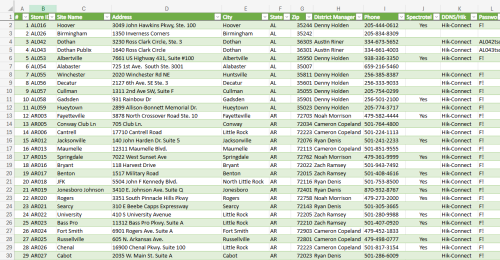
- Add store information into master list
- Address
- Phone number
- Store ID
- District manager

- Determine which project components will be installed
- How many cameras needed, 8 or 16 channel DVR, etc.
- Create CompanyCam project
- Obtain and screenshot blueprints & marked up blueprints
- Speakers, cameras and Wi-Fi locations
- Upload to CompanyCam
- Schedule technician
- Make sure they have what they need.
- Order any necessary parts
- NVR
- Hard Drive
- Cameras
- Cabling
- Confirm parts delivery
- On-Site Procedures:
- Take “before” photos
- Confirm parts/equipment on site
- Camera equipment
- Music equipment
- Spectrotel equipment
- Install Spectrotel
- Run cabling
- Install components
- MOOD
- Cameras
- Wi-fi access points
- Set up remote session with project manager
- Test/confirm components
- Take “after” photos
- Post-Installation Procedures:
- Add to DVR checks & appropriate weekly DVR checks
- NVR configurations
- Provide camera access to provided list of employees
- Complete CompanyCam final reports
- Upload Live View comparison photos to the wiki
- Get OOP cost from tech
- Notify Brian that they are ready to be billed
start/dyneonboardingchecklist.1780073494.txt.gz · Last modified: 2026/05/29 16:51 by bkadeg