
This is an old revision of the document!
Work Log 5-5-25
DW camera time and date project, verify h265 profiles
Completed:
- Carquest Brunswick
- Carquest Waycross
- Newberry
- Palm Coast
- Middleburg
- Chaffee
- Brunswick
Work Log 5-12-2025
- Investigated why Newberry time was reset to 2011, I think it having the option sync with time server is to blame. The cameras were also only up 8 hours across all cameras - changed time to sync with computer
- Meeting
Work Log 5-13-2025
DW date time project
- Ellianos Starke
Work Log 5-15-2025
- DW Checks
- Downed hosts check on HIK
DW date and time completions / h265 check
- Tower
- Palatka
- Harper
- Raintree time/date sync, fixed PC timezone and synced time
Work Log 5-19-2025
- fixed time on brunswick dw - set dw to push time to cameras
- checked remaining dw settngs for camera push
- checked action1 for updates for dw hosts - added to to-do
Work Log 5-20-2025
- Checked zabbix for downed hosts - update accordingly
- update zabbix host to maintain security
- schedule zabbix update after checking for bugs in update - updated zabbix to current
- Double check geovision cameras to make sure they have not reset time to 2011
- Reached out to Lauren Mixon about Newberry being offline - confirmed ISP is down
- Footage request for Freddy's Glasgow office camera - theft
- backup zabbix database on vultr vps to interserver and linode vps, google drive x2
Work Log 5-23-2025
- DW host windows updates
- create DW host anydesk wiki entry
Work Log 5-28-2025
- Wiki entries for Elliano's screens
- Reset camera names that had no spaces
Work Log 5-30-2025
- Update zabbix host, update client IPs on zabbix - backup zabbix db
- research windows home lock screen and update issues - tested registry edits on local Home installation
- check forums for problematic windows updates and issues regarding tp-link usb network adapters
- tested action1 remote patching on local systems to determine if updates can be installed without reboot and if system will respect NoAutoUpdate registry keys
Work Log 6-2-2025
- Remove date time from DW hosts
- meeting
- Brunswick
- Chaffee
- Check zabbix, update ips of failed ping hosts
Work Log 6-3-2025
- Remove Date/Time from DW hosts
- Middleburg
- Newberry
- Palm Coast
- Waycross
Work Log 6-4-2025
- Remove Date time from DW hosts
- Palatka
- Starke
- Harper
- Tower
Work Log 6-9-2025
- Verified and/or set AnyDesk passwords for DW hosts
- Created DW hosts AnyDesk code listing
- Created entry for DW Linux host troubleshooting of AnyDesk or remote linux admin
Work Log 6-12-2025
- Offline hosts check on HIK
- DW screens check
- Help Desk - responded to Cartersville email, windows backup screen was up
- Checked help desk for video signal lost messages and checked DVRs.
Work Log 6-16-2025
- Offline hosts check
- fl264 Bartram offline - ETR 1245 per comcast support
- fl303 doesn't load, but doesn't error. online via app, missing from ivms altogether.
- fl305 ip updated
- ga002 time synced
- ga059 back door moved - not recording as of 6-14-25@0732 - date reset to 2004 - time synced && reboot. recording
- ga084 PF issue
- ga113 down - phone straight to vm - internet down - tech dispatched
- add lisa.kessler@tridentholdingsllc.com to trident - 365099, 365090 365056
#######################
Work Log 07-30-2025
Downed hosts check on HIK. Updated zabbix linux host, zabbix server. Will pull backup after updating some IP
Help Desk -
- Camera access for AR013 - Andy Wilgus - “awilgus@dynehg.com” awilgus@dynehg.com - awaiting user response
- FL051 - awaiting acumera and capgemini
- FL309 was down, now up
- Verified GA084 as up per request
- Restored Chaffee client screen
- Restored Harper Screen
- Check microsoft update history site for any known issues with Windows updates before applying updates to DW hosts.
- Test updates on Windows VM with DW server and client
- Enabled camera access to AR046 for“Cheryl (Wilkinson) Switters” cswitters@dynehg.com
07-31-2025
- Downed hosts check
- GA059 down, called store, no response. Contacted ISP - ONT down - ticket 2010555
- FL201 down - open spectrotel ticket - outage in area
- clone zabbix server to local to allow better control of access - due to drive filling up with logs
08-01-2025
so in event viewer for CR220 Middleburg client, there is an exception code. The code is in the initial screenshot from Chad.
I restarted DW on the client, and it ran for 30 minutes before closing out. I checked event viewer, and the same code was there. I updated DW, and it ran for about 30 minutes again then errored again with “Exception code: 0xc0000409”
looking this error up, it's a buffer overrun, so either DW has an issue, or I think the memory could be at fault. I'm leaning towards the memory because no other location has this issue.
DW® #TSOR00303564 ticket
DW states that the server and clients need to be on the same exact version. Will update middleburg server tonight as to not disturb the screens during open hours.
attempt replication of middleburg dw server/client setup locally to see if app errors here, to check against potential memory issues.
older releases available at https://support.digital-watchdog.com/kb/article/997-dw-spectrum-previous-build-list/
08-06-2025 Troubleshooting CR220 Middleburg Elliano's:
- Made sure Server and Client were on same version
- Restarted Client - client crashes after around 30 minutes
- Event viewer has been kept open and now shows a failing DLL - ucrtbase.dll
- This module is part of Microsoft Visual C++ redistributables.
- Run sfc /scannow to check for module errors
- found articles with repair options -
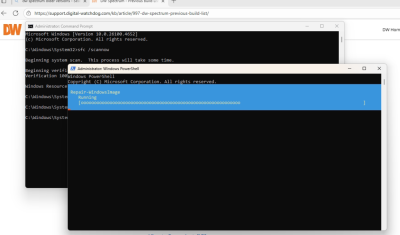
- Replaced ucrtbase.dll in DW client folder with new version from Microsoft. Testing again
- Only 6.0.2 DW client is installed currently, however, the “about” in the client window shows 6.0.3, leading me to believe the archive from DW download section is the wrong binary. This could be causing issues due to client/server not having the same versions.
- Issue persists after dll upgrade, loading the dll also errors out with the below message:
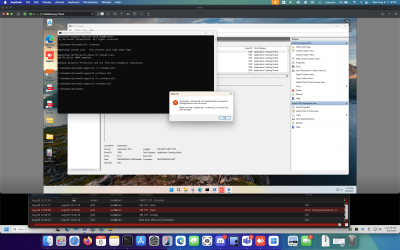
- This DLL crashing is tied to memory allocation and input/output processing. Attempted to replicate variables on another windows install and the DW client does not crash. New DLL in DW folder did allow the program to run for a longer period of time.
- Reaching back out to DW with the above troubleshooting steps.
- 3pm - email update from DW -


“After speaking with an escalation tech, they mentioned updating the client to 6.0.5 and keeping the server on the 6.0.2 version. They also mentioned applying the .dll files anyways once the client is updated to ensure the proper files are being utilized. They mentioned too, to adjust the graphics settings either in Windows or if the graphics card has options to adjust, you would want to tinker with resolution and display settings to see if this improves stability. In DW Client you can disable features such as double buffering or blur effects, as these might help if the issue is related to graphics rendering.”
Applied changes mentioned by DW TS - timing client application runtime
9PM restarted Chaffee Client and restored DW screen
08-11-2025
- IP changes in zabbix
- Meeting
- Working on Pearl internet issues, phone down. Comcast says it's up. Doing a reset and tech if stays down. CR215052455
- Famous Dave's Hermitage - callback at 2pm. IP changed - still down - reached out to bbq-holdings IT about both sites
- Famous Dave's Smyrna - callback two hours after open
08-12-2025
- GA059 down - ISP tracker shows hargray, but whois of IP shows Comcast. Checked for outages - contacting store to check for IP change
- Hermitage and Smyrna still down - IT service has only auto-responded so far.
- Help Desk - cleared out overflow of OK034 network breakdowns,
08-13-2025
- DW Checks
- Restored Newberry screens
- Help Desk - Remove Camera access for Elizabeth Gailey@Commerce 363626
- Responded to Slim Chickens Tupelo request for assistance - Manager onsite this afternoon for troubleshooting
- Pearl troubleshooting after manager finds person on location to help
- Troubleshoot Pearl CD with Bruce, the GM. Wan to Cablemodem not lit up. Lan to switch not lit up on Unifi gateway.
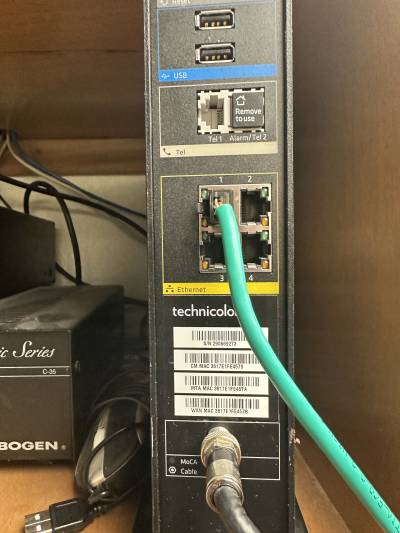
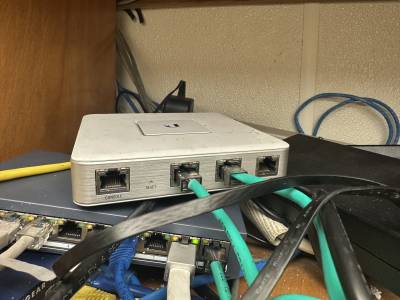


I believe the UCG is in an error state - may need to be replaced.
- cloning zabbix from VULTR vps to linode and InterServer
08-14-2025
- Updating IPs in Zabbix for failed ping hosts
- updated zabbix host to latest kernel and security updates
08-15-2025
- Help Desk - responded to inquiry about Pearl and 80 West. Pearl Unifi appears broken. 80 west was not closing out last night, GM Maria states Cybera was red this morning. She restarted it. Will verify that it closes out tonight.
- Tower back screen was frozen - restored.
- Footage request for Mark Philips at Woodrow Wilson completed.
- Middleburg had multiple camera streams dropping - all were online when checked. Will add this location to double checking periodically.
08-18-2025
- Both footage requests for Fairfield.
- Meeting
- update several host IP in zabbix, update zabbix server - pull DB backup
08-19-2025
- Pearl and Somerset offline
- Pearl unifi gateway has no lights
- Somerset cable modem non-compliant, being swapped today from 11-3. New equipment is separate modem and router.
- 6pm - Bruce on video call - ran Comcast port 1 to port 9 Hik switch. Port 8 Hik switch to WAN 1 Cybera. Store main internet restored. Will work with Tim later to get DVRs back online.
08-21-2025
- 0440 DW Checks
- zabbix downed hosts checks - updated several IP due to dhcp addressing change
08-26-2025
- Footage for Savannah CD
- Restored middleburg main screen - client is offline and was apparently off. Staff hit power button on pc but it's only flashing. Will probably require a visit.
- Middleburg Client - staff was powering off and on the wrong PC, i noticed main going off. I had to double clarify that mini pc meant the little one on top. Client booted into windows update - waiting till login and restored screen.
- Cleared out hundreds of CD Jonesboro 2 notifications in help desk.Checked DVR, all cameras up, appears to be no missing footage